Back to selected work05 / 06
Landing Page
Designing a landing page for English language learning
A responsive landing page designed to help prospective students explore English courses, understand program offerings, and register through a clear and structured experience.
International Language Professional — Landing Page DesignEnglish Language Learning
- Client
- International Language Professional Course
- Industry
- Education / Language Learning
- Timeline
- 1 Month
- Role
- UI/UX Designer
- Platform
- Responsive Website
- Tools
- Figma
01
About the project
International Language Professional (ILP) is an English language course that needs a clear digital presence to introduce its programs to prospective students. The project focuses on designing a responsive landing page that presents course information, helps visitors explore available offerings, and guides them toward registration.
The problem
Prospective students need to understand the available English courses and find relevant information before deciding to register. Without a clear content structure and navigation, visitors may struggle to compare program information or identify the next step. The landing page needs to communicate the course offerings clearly while providing a straightforward path to registration.
Project goals
- Present English course offerings in a clear and organized structure.
- Help prospective students understand the available programs.
- Create a responsive experience across desktop and mobile devices.
- Guide visitors toward registration through clear calls to action.
02
User flow
- 1
Visit the ILP landing page.
- 2
Explore the course introduction and available programs.
- 3
Review relevant course information.
- 4
Identify the appropriate registration option.
- 5
Proceed to the registration process.
03
The solution
- Organize landing page content into clear, easy-to-scan sections.
- Establish a visual hierarchy that helps visitors explore course information.
- Design responsive layouts for desktop and mobile screens.
- Place clear calls to action throughout the user journey to guide visitors toward registration.
04
Design process
- 1User flow
Map the visitor journey
Define how prospective students move from discovering ILP to exploring course offerings and proceeding toward registration.
- 2Information architecture
Structure the course information
Organize page content so visitors can understand the course offerings and find relevant information without unnecessary friction.
- 3Wireframing
Define the page layout
Translate the information structure into wireframes that establish the placement of content, navigation, and calls to action.
- 4UI design
Create the visual experience
Develop a consistent visual interface that communicates ILP's course offerings and supports easy content discovery.
- 5Prototyping
Connect the experience
Build an interactive Figma prototype to demonstrate the landing page structure and the intended journey toward registration.
05
The Interface
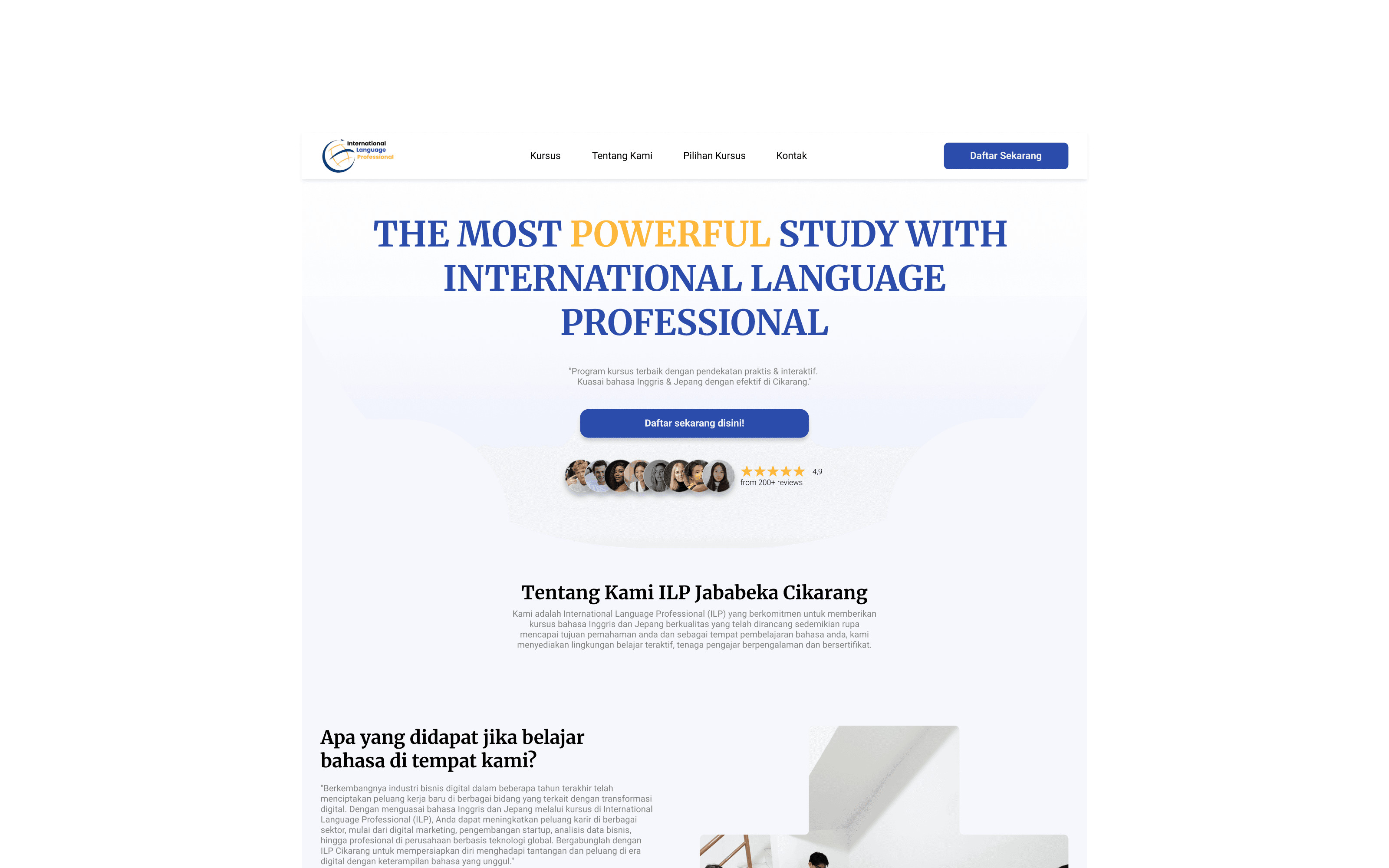
International Language Professional — Landing Page
06
Behind the work
My responsibilities
- Mapping the user flow for prospective students.
- Defining the information architecture of the landing page.
- Creating wireframes for the page structure.
- Designing responsive UI layouts in Figma.
- Building an interactive prototype of the landing page.
Design decisions
- Structure content around the questions prospective students may have when exploring a course.
- Use a clear visual hierarchy to distinguish course information and supporting content.
- Plan responsive layouts to maintain readability across screen sizes.
- Make registration calls to action visible within the visitor journey.
Constraints & considerations
- Course information needs to be presented clearly for prospective students.
- The landing page should remain usable across desktop and mobile screen sizes.
- The registration journey should be easy to understand and follow.
- Final course details and registration requirements should reflect the information provided by ILP.
Key learnings
- A landing page needs to balance information delivery with a clear next step.
- Information architecture helps prospective students navigate course offerings more easily.
- Responsive design requires content prioritization rather than simply shrinking desktop layouts.
- User flow and calls to action should work together to support the intended visitor journey.
07Project outcome
A responsive landing page design concept for International Language Professional Course, structured to introduce English course offerings, support information discovery, and guide prospective students toward registration. Performance metrics and user testing findings can be added when available.
- UI/UX Designer
- 1 Month
- Responsive Website
Have a project in mind?
Let's make
something meaningful.
Open to opportunities, collaborations, and interesting conversations about design and technology.